neuron Algo Follow Insurer Experience API
Authentication 🔐
🛡️ Overview
This page explains how to securely access the Insurer Experience API, including authentication using JWT (OAuth 2.0) and Client ID Enforcement, as well as connection-level security and credential access.
The Insurer Experience API enforces a strict security model to ensure confidentiality, integrity, and controlled access to all resources.
All requests must:
- Use HTTPS/TLS 1.2+
- Include a valid JWT bearer token or a valid Client ID
- Use port 443
Unencrypted HTTP connections are not supported.
🌐 Transport & Network Security
TLS Requirements
To ensure confidentiality and integrity:
- Only TLS 1.2 or higher is allowed.
- Plain HTTP or downgraded SSL connections are rejected.
Port Requirements
To reach Neuron service endpoints:
- Outbound access to port 443 is required.
- Firewalls and proxies may require updates to allow communication.
🔑 JWT Validation (OAuth 2.0)
The Insurer Experience API supports OAuth 2.0 using JWT Bearer tokens for authentication.
Include the token in every request:
Authorization: Bearer <access_token>Identity Provider
Neuron integrates with Azure Active Directory (Azure AD) using a Multi-Tenant Application Model.
Token Validation Rules
The API gateway verifies:
| Claim | Requirement | Purpose |
|---|---|---|
aud | Must match API audience | Ensures token is intended for Neuron |
roles | Must include required roles | Enforces access authorization |
tenantId | Must match onboarding configuration | Validates organisation-level access |
exp | Must be unexpired (max 60 min) | Limits token misuse |
| Signature | Must match Azure AD JWKS | Ensures token integrity |
Error Handling
Invalid tokens return:
401 Unauthorized
Error: Invalid Token
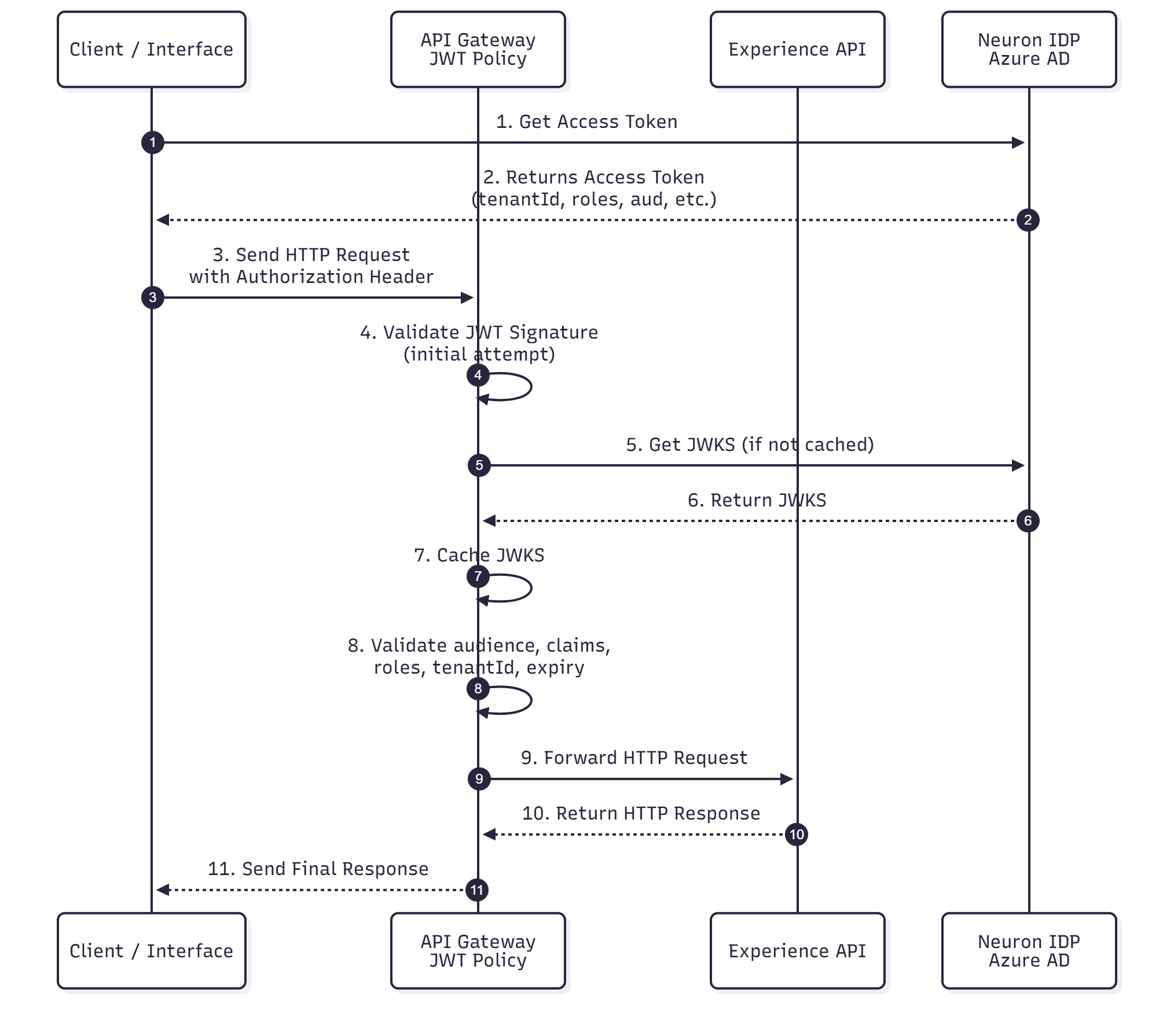
🔁 JWT Validation Flow (Sequence Diagram)
Below is the full authentication and validation workflow, including token issuance, JWKS retrieval, caching, and downstream API invocation.
🧾 Client ID Enforcement
For APIs configured to use Client ID Enforcement, requests must include:
client_id: <your-client-id>Refer to the Getting Started guide for how to obtain your client_id.
Error Handling
When the client ID is missing or invalid:
401 Unauthorized
Error: Invalid Client Id
🧵 Accessing JWT Credentials
To obtain JWT credentials for your application:
- Contact the Neuron Operations & Support Team.
- Provide your environment details and intended API usage.
- The team will issue access details and onboarding instructions.
Support Contact:
tbd